Automate your job before your boss does.
Products
Web Console
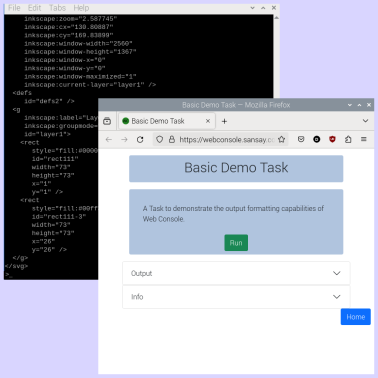
A simple way of enabling your non-technical users to run console-based applications (Python, PowerShell, etc - even old Windows / DOS batch files). Written in Go, with dependency-free compiled executables available for Windows, MacOS and Linux (including Raspberry Pi), works as a simple stand-alone web server, using your preferred reverse proxy or network ingress solution to provide HTTPS. Now with built-in support for authentication via Cloudflare Zero-Trust and NGrok and webhook integration with common consumer automation services such as IFTTT, Zapier and Github Actions.

Docs To Markdown
Built around the popular and well-respected Pandoc project, converts structured folders of content from Word / Excel documents (including from Office 365 and Google Docs / Sheets) to Markdown suitable for use with common static site generation tools such as Hugo, Jekyll and Eleventy. It provides a simple way for users to manage website content through editing documents on their PC or from Office 365 / Google Drive. Self-hosted - this website’s content is held in a set of Word documents, edited in the browser on Google Drive.
DOCX Merge
Automated document merging utility. Works with Word files (generated by Microsoft Office, Office 365 or Google Docs), when coupled with a utility such as rclone to access cloud-based file systems it can provide automated mailmerge functionality for Google Drive / Office 365. Supports input data in Excel, CSV and iCal (calendar) format.
Device Config
A set of scripts to configure a device or virtual machine to perform a specific function. For instance, to configure an instance of Raspberry Pi OS (Debian based, running on the Pi hardware or on an Intel PC / laptop) as a web kiosk device, just loading a web browser with a given URL.
Pi View
A simple-but-handy browser-based camera preview page, especially useful when used with a cheap HDMI-to-USB adaptor to allow a Raspberry Pi to use a laptop / all-in-one device as a monitor.
Services
Installation
Help installing and configuring Web Console. Setup on your own server (physical server, virtual environment or on a hosting service) - Linux, Windows and Raspberry Pi platforms supported. Can include integration of an authentication service - Cloudflare Zero Trust and Ngrok are currently built-in, with user lists imported via simple CSV lists, further services and user directories (Active Directory, LDAP, Wonde, Clever, etc) can be added as appropriate.
Dedicated Hosting
We will configure and host a server instance set up with Web Console, complete with user authentication. The default setup is on a small Linux VM with a Python development environment and 5 included authenticated users, different platforms (e.g. Windows), larger VMs and more authenticated users are available. From £50 a month.
Shared Hosting
Your project / website, hosted on our shared server. No edit access to any code, but website content can be edited. A Hugo static website template is provided by default, other static site generators can be supported (Jekyll, Eleventy, possibly others). A good option for those wanting a custom-developed solution but don’t want to maintain it themselves. From £30 a month.
Custom Software / Website Development
From £300 per day. Current experience with Python, Go, Javascript / HTML / CSS (JQuery, Bootstrap framework v4 & v5) and some previous experience with C, C++, Pascal, Basic, Assembly, Modula-2, Java, SQL, Scheme, Postscript and various domain-specific / specialised embedded languages (DSSSL, Liquid, etc). Work with various static website generators (Hugo, Jekyll, Eleventy). Extensive experience in the UK education sector and with associated services - Windows Server / Active Directory, Google Workspace, iSAMS, Wonde, Clever and various REST-based APIs.
We specialise in “batch” processing scripts, including those triggered by webhooks. We probably aren’t the place for extensive front-end development projects or Wordpress hosting.